Patient Satisfaction Survey Automation for Healthcare Admins
By Rowena Tulacz · · 9 min read

Most healthcare organizations collect patient satisfaction data the hard way: paper forms, manual data entry, delayed reports, and response rates that rarely crack 20%. By the time you identify a problem, the patient is long gone and the moment for service recovery has passed. Patient satisfaction survey automation changes that equation entirely. Known formally as automated patient feedback systems or healthcare survey automation, this approach replaces reactive, manual processes with event-triggered workflows that collect, analyze, and escalate feedback in near real time. This guide walks you through exactly how to plan, build, and optimize that system.
Table of Contents
- Key takeaways
- Patient satisfaction survey automation: what you need before you start
- How to execute the automation: a step-by-step workflow
- Common mistakes that derail automated survey programs
- Measuring impact and improving continuously
- My honest take on where most practices get this wrong
- See how Byrcs can automate your patient surveys
- FAQ
Key takeaways
| Point | Details |
|---|---|
| Timing drives data quality | Collecting feedback within hours of a visit captures more accurate sentiment than mail surveys arriving weeks later. |
| Event-based triggers prevent fatigue | Smart trigger logic sends surveys only after relevant clinical events, keeping patients engaged without overwhelming them. |
| Multi-channel delivery raises completion | Distributing surveys via SMS, email, and patient portals with automated reminders outperforms any single-channel approach. |
| Negative feedback needs a workflow | Automated alerts for low scores allow your team to respond before a complaint becomes a public review. |
| Analytics close the improvement loop | Connecting survey data to dashboards and AI-powered analysis turns raw scores into targeted operational changes. |
Patient satisfaction survey automation: what you need before you start
Before you configure a single trigger, you need an honest assessment of where your current process breaks down. Pull your last 12 months of survey data and ask: What is your actual response rate? How long does it take to receive and review results? Are you surveying every patient or only those who received a paper form at checkout? Most practices discover they are working with incomplete, delayed, and unrepresentative data.
The technical foundation matters just as much as the strategy. Effective healthcare survey automation requires integration with your Electronic Health Record (EHR) system so that clinical events, such as completed appointments, discharges, or procedure completions, can automatically trigger survey delivery. Without that connection, you are back to manual list exports and batch sends.
Here is what you need to have in place before launch:
- EHR or practice management system integration with API access or a pre-built connector to your survey platform
- Patient contact data that is current, with verified email addresses and mobile numbers stored in your system
- Defined patient journey touchpoints where feedback is most meaningful, such as post-visit, post-procedure, and post-discharge
- Survey questionnaires designed for each clinical event, not a single generic form applied to every interaction
- HIPAA-compliant survey platform with secure data transmission and storage, because patient feedback is protected health information
- Staff roles clearly assigned for monitoring dashboards, responding to alerts, and routing feedback to department heads
Compliance deserves more attention than most administrators give it at this stage. Survey responses that reference clinical details can constitute protected health information under HIPAA. Your platform vendor must sign a Business Associate Agreement (BAA), and your survey questions need legal review before deployment.
Pro Tip: Start with one high-volume touchpoint, such as post-primary care visit, before expanding to specialty departments. A focused pilot surfaces integration problems and staff adoption gaps without disrupting your entire operation.
How to execute the automation: a step-by-step workflow
Once your infrastructure is in place, the real work is designing the logic that makes the system run without manual intervention. This is where event-based trigger logic becomes your most important tool.
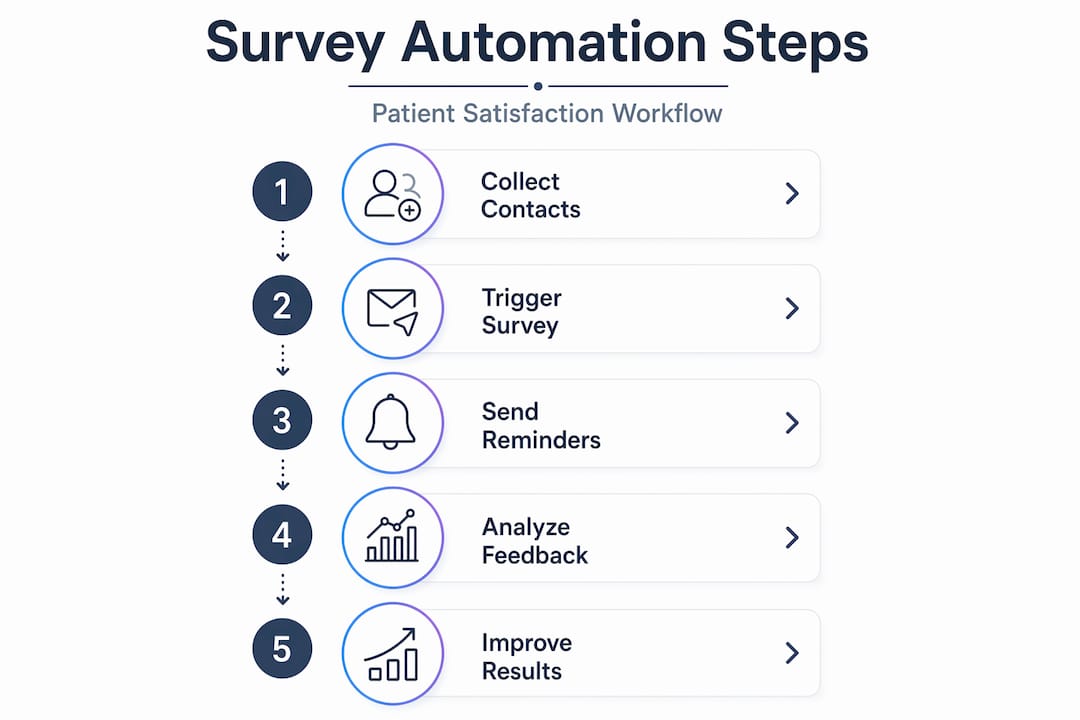
Here is a practical implementation sequence:
- Map your trigger events. Identify the clinical events that should initiate a survey send: appointment completed, procedure finished, inpatient discharge, telehealth visit ended. Each event in your EHR becomes a potential trigger point.
- Set delivery timing. Send surveys within minutes or hours of the triggering event. Real-time feedback collection captures 80% of responses near day 8, compared to mail surveys that reach the same threshold around day 40, with measurably less sentiment decline.
- Choose your delivery channels. Deploy surveys across multiple channels simultaneously: SMS for immediate reach, email for patients who prefer it, and patient portal messages for those already engaged with your digital tools.
- Design adaptive survey logic. Use conditional branching so that a patient who rates their visit a 3 out of 10 sees a follow-up question asking what went wrong, while a patient who scores a 9 is asked what stood out. Generic linear surveys miss this nuance entirely.
- Configure automated reminders. Set a single reminder 24 to 48 hours after the initial send for non-responders. More than one reminder crosses into harassment territory and damages response quality.
- Build a negative feedback alert workflow. Any response below your defined threshold, typically a score of 6 or lower on a 10-point scale, should trigger an immediate alert to the relevant department manager. Speed matters here. A same-day callback to an unhappy patient resolves the issue before it reaches a review platform.
- Connect data to a centralized dashboard. All survey responses should feed into a single reporting environment where administrators can monitor scores by provider, department, and time period.
The table below shows how delivery channel choice affects your program's reach and speed:
| Channel | Average response time | Best for | Limitation |
|---|---|---|---|
| SMS | Under 2 hours | High-volume, post-visit surveys | Requires verified mobile numbers |
| 4 to 24 hours | Detailed or multi-question surveys | Lower open rates in older demographics | |
| Patient portal | 24 to 72 hours | Engaged digital patients | Requires portal login |
| Tablet/kiosk | Immediate, on-site | High-traffic waiting areas | Captures only willing participants |
Pro Tip: For mobile-optimized surveys, keep the survey to five questions or fewer. Completion rates drop sharply when mobile users face more than a two-minute completion time.
Common mistakes that derail automated survey programs
Even well-designed systems run into problems. Knowing where things typically go wrong saves you months of troubleshooting.
- Over-surveying the same patient. If a patient has three appointments in a month, they do not need three separate surveys. Effective trigger logic includes suppression rules that limit survey frequency per patient, typically to once every 30 to 90 days depending on visit volume.
- Using a one-size-fits-all questionnaire. A post-surgical survey and a routine wellness visit survey should ask completely different questions. Sending a surgical recovery question to someone who came in for a flu shot erodes patient trust in your process.
- Ignoring low response rates as a data quality signal. A response rate below 15% does not just mean you have less data. It means your data is skewed toward patients with strong opinions, usually negative ones. Investigate delivery failures, timing issues, and channel mismatches before drawing conclusions from the numbers.
- Failing to close the feedback loop with staff. Survey data that goes into a dashboard nobody checks is worse than no data at all. It creates the illusion of measurement without the substance of improvement.
- Underestimating integration complexity. EHR systems vary widely in their API capabilities. Budget time for testing, not just configuration. A trigger that fires correctly in a staging environment may behave differently in production.
- Skipping staff training. Front desk staff and clinical coordinators need to understand what the system does, what they are responsible for monitoring, and how to escalate negative feedback alerts. Automation handles the sending; humans handle the response.
Measuring impact and improving continuously
Launching your system is the beginning, not the finish line. The organizations that extract the most value from healthcare survey automation are the ones that treat survey data as a continuous quality management input, not an annual report.
The metrics worth tracking fall into two categories: program health and patient experience outcomes.
| Metric | What it tells you | Target benchmark |
|---|---|---|
| Survey response rate | Whether your delivery and timing are working | 30% or higher |
| Average satisfaction score | Overall patient experience trend | Facility and specialty dependent |
| Negative feedback rate | Volume of low-score responses requiring follow-up | Below 5% of total responses |
| Time to service recovery | How quickly staff respond to flagged responses | Under 24 hours |
| Score improvement over time | Whether operational changes are working | Upward trend quarter over quarter |
A 2022 to 2024 study across 2,137 patient surveys demonstrated that structured automation enabled an orthopedic hospital to maintain satisfaction scores at or above 9.7 out of 10, with a 68.7% response rate and a marked decline in negative comments over time. That kind of result does not happen by accident. It comes from connecting survey data to specific operational decisions.

The next level of analysis involves AI. AI-powered survey analytics can automatically detect recurring themes in open-text responses, flag topics that appear frequently, and route recommended improvement actions through an approval workflow. Instead of a manager reading 400 comments manually, the system surfaces the top five issues and suggests responses. This is where AI agents in patient survey intelligence are already changing how quality teams operate.
Pro Tip: Schedule a monthly review meeting with department heads where the agenda is built entirely from survey data. When clinical leaders see their own scores alongside operational metrics, improvement becomes personal rather than abstract.
Tying survey results to specific data-driven improvement decisions requires a feedback loop structure: collect, analyze, act, and measure the effect of the action. Without that fourth step, you are running a measurement program, not an improvement program.
My honest take on where most practices get this wrong
I have watched healthcare organizations spend significant budget on survey platforms and then wonder why nothing changed. The technology was fine. The process around it was not.
The most common failure I see is treating automation as a set-it-and-forget-it solution. You configure the triggers, the surveys go out, the dashboard fills up with data, and then… nothing happens with it. No one owns the negative feedback alerts. No one connects the scores to staffing decisions or training gaps. The data becomes noise.
What actually works is pairing the automation with a human accountability structure. Someone specific needs to own each alert category. A patient who scores a 4 on post-visit communication should receive a follow-up call from a real person within 24 hours. The automation creates the opportunity. The person closes it.
I also think the industry underestimates how much timing matters. Sentiment drift is real. A patient who had a frustrating 20-minute wait will report it accurately two hours after their visit. Three weeks later, they have moved on, and the data you collect reflects a faded memory rather than the actual experience. If your survey is arriving by mail in week four, you are not measuring what you think you are measuring.
The practices that get the most out of automation are the ones that treat every survey response as a signal, not a score. A 7 out of 10 with no comment is less useful than a 6 with a specific complaint. Build your system to capture that specificity, and then build your team to act on it.
— Rowena
See how Byrcs can automate your patient surveys
If you are ready to move beyond manual survey collection, Byrcs builds automation workflows specifically designed for healthcare practices. The BizOps platform connects directly to your existing scheduling and CRM systems, triggering surveys at the right moment across the right channels, without adding work to your front desk team.
Byrcs clients in healthcare have reduced manual feedback tasks by an average of 50% while improving response rates and capturing more actionable data. The platform handles appointment-triggered survey delivery, automated reminders, negative feedback escalation, and centralized reporting in one connected workflow. If you want to see what that looks like for your specific practice setup, explore the BizOps platform and request a demo tailored to your patient volume and care model.
FAQ
What is patient satisfaction survey automation?
Patient satisfaction survey automation is the use of software to trigger, deliver, and analyze patient feedback surveys without manual effort. Surveys are sent automatically based on clinical events like completed appointments or discharges.
How do automated patient satisfaction surveys improve response rates?
Multi-channel delivery with automated reminders consistently outperforms manual survey distribution by reaching patients through their preferred channel at the right time, typically within hours of their visit.
How often should automated surveys be sent to patients?
Most programs limit survey frequency to once every 30 to 90 days per patient, regardless of visit volume. Suppression logic built into your trigger rules prevents over-surveying and survey fatigue.
What data do you need to start automating patient surveys?
You need verified patient contact information, EHR integration for event triggers, a HIPAA-compliant survey platform, and defined touchpoints in the patient journey where feedback is most relevant.
Can automated survey data be used for quality improvement programs?
Yes. AI-powered analytics tools can identify recurring themes in survey responses, generate improvement recommendations, and route them through clinical quality management workflows automatically.
Want this set up for your business?
Book a free 30-minute strategy call and we'll map out your automations together.
Book a Free Call