New Patient Onboarding Workflow for Clinics in 2026
By Rowena Tulacz · · 9 min read
New Patient Onboarding Workflow for Clinics in 2026
TL;DR:
- A well-designed, digital-first patient onboarding workflow reduces errors, shortens wait times, and enhances long-term retention.
- Automating pre-visit communication, intake forms, insurance verification, and data entry ensures efficiency, accuracy, and patient confidence.
A new patient onboarding workflow in clinics is the coordinated process of collecting patient information, verifying eligibility, and establishing clinical documentation to deliver efficient care from the very first visit. In healthcare administration, this process is formally called patient intake management, and it spans everything from pre-visit form distribution to EHR data entry and insurance verification. Clinics that build a structured new patient onboarding workflow reduce administrative errors, shorten wait times, and set the foundation for long-term patient retention. Platforms like Clinicmaster, CloudRep AI, and Go High Level automation tools are reshaping how clinics execute these workflows in 2026, replacing paper-heavy processes with digital, automated systems that serve both patients and staff.
What are the key components of effective new patient intake forms?
New patient intake forms are the first clinical document a patient completes, capturing demographics, insurance details, medical history, reason for visit, and required consents. Getting this document right is not a minor administrative detail. It determines whether your clinical team walks into the first appointment prepared or scrambling.
Every intake form should collect the following categories of information:
- Patient demographics: Full legal name, date of birth, address, phone number, and preferred contact method
- Insurance and billing details: Primary and secondary insurance carrier, policy number, group number, and guarantor information
- Medical history: Current medications, known allergies, past surgeries, chronic conditions, and family history relevant to the chief complaint
- Reason for visit: Chief complaint in the patient's own words, symptom duration, and severity
- Consents and acknowledgments: HIPAA Notice of Privacy Practices acknowledgment, consent to treat, financial responsibility agreement, and any release of records authorizations
Design principles matter as much as content. Forms written in plain language with logically grouped fields reduce patient confusion and incomplete submissions. Mobile optimization is no longer optional. A significant share of patients complete forms on smartphones before their appointment, and a form that renders poorly on mobile will generate errors and callbacks that cost your front desk time.
Digital pre-visit completion of intake forms improves accuracy and gives clinicians time to review patient history before the patient arrives. Digital forms also flow directly into your EHR, eliminating manual transcription errors and flagging incomplete submissions automatically for follow-up.

Pro Tip: Send intake forms via SMS or email at least 48 hours before the appointment. Patients who complete forms in advance reduce check-in time by several minutes per visit, which compounds significantly across a full day's schedule.
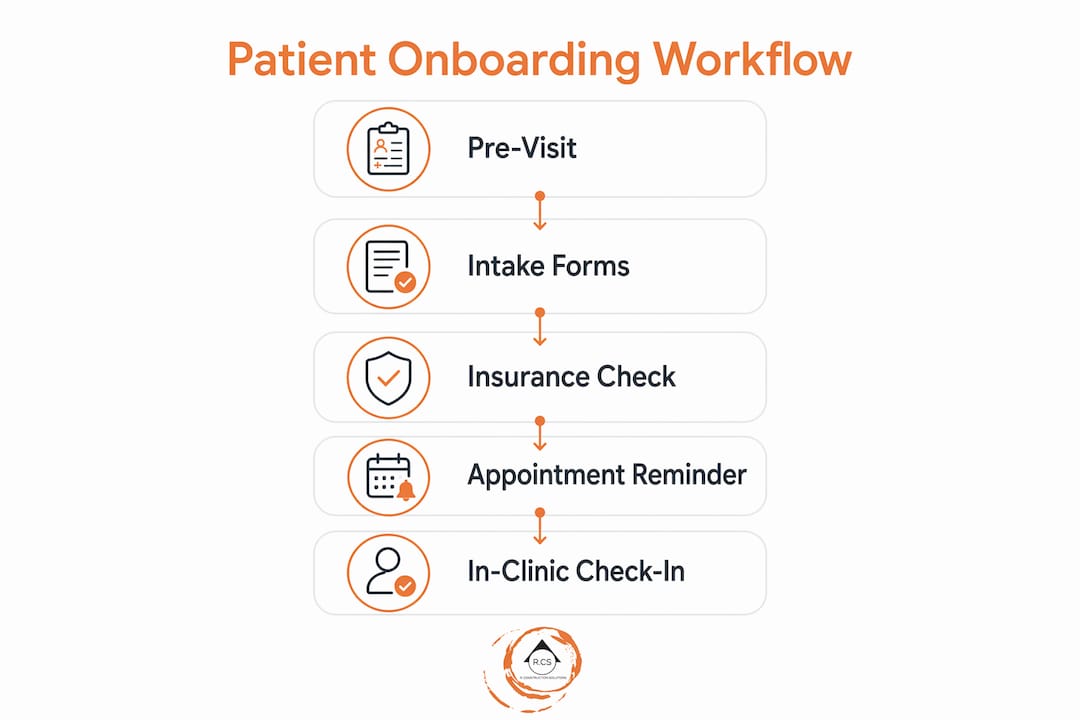
How can clinics build a step-by-step onboarding workflow to maximize efficiency?
A well-structured patient registration process follows a defined sequence that assigns clear ownership at each stage. Without that structure, tasks fall through the cracks, staff duplicate effort, and patients experience delays that damage their first impression of your clinic.
Here is a practical step-by-step framework for clinic onboarding procedures:
- Send pre-visit communication: Within 24 hours of scheduling, send a welcome message with intake form links, parking instructions, and what to bring. Use automated SMS and email through a platform like Go High Level or your EHR's patient portal.
- Distribute and collect intake forms: Send digital forms 48 to 72 hours before the appointment. Set automated reminders for incomplete submissions 24 hours before the visit.
- Verify insurance eligibility: Run eligibility checks at least 24 hours before the appointment using your billing software or a clearinghouse like Availity or Change Healthcare. Do not wait until the patient is in the waiting room.
- Enter data into the EHR: Assign a designated staff member to review completed forms and enter or confirm data in the EHR before the appointment. Flag any missing information for resolution at check-in.
- Confirm the appointment: Send a final confirmation 24 hours before the visit with any outstanding action items for the patient.
- Execute check-in: Use a digital check-in kiosk or tablet to capture any remaining signatures and confirm demographic accuracy. Keep this step under five minutes.
- Conduct the clinical encounter: The provider reviews pre-loaded intake data and proceeds with the visit without needing to re-collect information verbally.
- Post-visit follow-up: Trigger automated follow-up messages for appointment summaries, next steps, or recall scheduling.
| Workflow stage | Primary owner | Tool or system |
|---|---|---|
| Pre-visit communication | Front desk coordinator | Go High Level, EHR portal |
| Insurance verification | Billing specialist | Availity, Change Healthcare |
| EHR data entry | Medical assistant | Clinicmaster, Epic, Athenahealth |
| Appointment confirmation | Automated system | SMS/email automation platform |
| Post-visit follow-up | Care coordinator | CRM or EHR recall module |
Automation across onboarding vendors and processes decreases delays, errors, and compliance risks by enabling parallel processing and real-time progress monitoring. That means insurance verification, form collection, and EHR prep can happen simultaneously rather than sequentially.
Pro Tip: Assign a single staff member as the "onboarding owner" for each new patient. When everyone is responsible, no one is. One named owner per patient record eliminates the most common source of dropped tasks.
What technology tools support new patient onboarding automation?
The right technology stack converts a fragmented patient registration process into a predictable, repeatable system. Clinics in 2026 have access to purpose-built tools that handle every stage of onboarding with minimal manual intervention.
AI voice agents and scheduling automation embedded in EHR workflows reduce front desk workload and improve patient engagement. The integration of CloudRep AI with the Clinicmaster platform is a concrete example. CloudRep AI handles inbound patient calls, answers scheduling questions, and routes complex inquiries to human staff, freeing your front desk to focus on in-person patient interactions.
| Tool category | Example platforms | Primary onboarding function |
|---|---|---|
| Clinic management software | Clinicmaster, Athenahealth, Epic | EHR data entry, scheduling, billing |
| AI voice and chat agents | CloudRep AI, Conversational AI tools | Inbound call handling, appointment booking |
| CRM and automation platforms | Go High Level, Salesforce Health Cloud | Patient communication, reminders, recall |
| Insurance verification | Availity, Change Healthcare | Real-time eligibility checks |
| Digital intake forms | Commure, Phreesia, IntakeQ | Pre-visit form collection and EHR integration |
Beyond the tools themselves, security and compliance are non-negotiable. Any platform handling patient data must meet HIPAA requirements for data encryption, access controls, and audit logging. Clinics evaluating digital form platforms should review the HIPAA-compliant hosting checklist before committing to a vendor.
Key capabilities to prioritize when evaluating onboarding technology include:
- Bidirectional EHR integration that eliminates duplicate data entry
- Automated eligibility verification triggered by appointment scheduling
- Patient-facing mobile forms with e-signature capability
- Real-time status dashboards so staff can see where each patient is in the onboarding process
- HIPAA-compliant data storage and transmission
For clinics exploring AI-powered workflow automation, the return on investment comes from reducing the manual tasks that consume front desk hours without adding clinical value.
What are common mistakes in patient onboarding workflows and how to avoid them?
Poor onboarding processes share predictable failure patterns: unclear staff ownership, lack of feedback loops, and operational chaos that erodes both patient confidence and staff retention. Recognizing these patterns early lets you correct them before they become embedded in your clinic culture.
The most common mistakes clinic administrators make in new patient onboarding include:
- Overly long intake forms: Forms that ask for information already captured at scheduling, or that include fields irrelevant to the visit type, increase abandonment rates and frustrate patients before they walk through the door.
- No defined staff ownership: When intake tasks are shared across the whole team without clear assignment, critical steps like insurance verification get delayed or skipped entirely.
- Late insurance verification: Running eligibility checks at check-in rather than 24 hours prior creates bottlenecks at the front desk and surprises patients with unexpected coverage issues.
- Ignoring mobile usability: A form that works on a desktop but breaks on a smartphone forces patients to call in or complete paper forms on arrival, defeating the purpose of digital intake.
- Underusing automation: Clinics that manually send appointment reminders and follow-up messages spend staff time on tasks that an automated platform handles in seconds.
- Never auditing the workflow: Onboarding processes that were designed two years ago may no longer reflect current payer requirements, EHR capabilities, or patient expectations.
"Well-structured onboarding reduces clinical chaos, improves documentation efficiency, and increases clinician confidence and retention." — High Bar Health
Physician credentialing is one area where process gaps carry serious financial consequences. In 2026, CAQH ProView profiles require strict 120-day re-attestation cycles to maintain billing readiness. Missing that window can suspend a provider's ability to bill payers, directly impacting clinic revenue.
How do you measure success and continuously improve your onboarding process?
Measuring the performance of your onboarding workflow is what separates clinics that improve from those that repeat the same inefficiencies year after year. Without defined metrics, you cannot identify where patients drop off, where staff lose time, or where your process creates friction.
The key performance indicators every clinic should track include:
- Form completion rate: The percentage of new patients who complete intake forms before their appointment. A rate below 70% signals a problem with form length, delivery timing, or mobile usability.
- Insurance verification turnaround time: How long it takes from appointment scheduling to confirmed eligibility. The target is under 24 hours.
- Check-in duration: Average time from patient arrival to being seen by a provider. Anything above 10 minutes for a prepared new patient indicates a process gap.
- Data entry error rate: The frequency of corrections needed after intake data is entered into the EHR. High error rates point to manual transcription problems that digital intake would eliminate.
- Patient satisfaction scores: Post-visit surveys specifically asking about the intake and check-in experience provide direct feedback on the patient-facing side of your workflow.
Automated onboarding systems can reduce documentation completion time from 30 to 90 days down to as little as 10 days. That compression is only possible when you are measuring baseline performance and tracking improvement over time.
Calendar-defined mentorship within the first 30 days is critical to sustaining documentation efficiency and operational stability for new clinical staff. Pair metric tracking with regular workflow audits, at minimum quarterly, to catch process drift before it affects patient experience.
Pro Tip: Build a 15-minute monthly workflow review into your team meeting agenda. Review your top three onboarding KPIs, identify the single biggest friction point, and assign one owner to resolve it before the next meeting. Small, consistent improvements compound faster than periodic overhauls.
For clinics that want to connect scheduling efficiency directly to revenue, appointment setting automation provides a practical starting point for embedding AI into your intake and scheduling process.
Key takeaways
A structured new patient onboarding workflow, supported by digital intake forms, automated communication, and EHR integration, is the most direct path to reducing administrative burden and improving patient satisfaction in clinic operations.
Why most clinics solve onboarding from the wrong end
After working closely with healthcare administrators on workflow design, I have noticed a consistent pattern. Most clinics start their onboarding improvement efforts by looking at the check-in desk. They add a kiosk, redesign the waiting room, or train front desk staff on a new script. The problem is that by the time a patient reaches check-in, the damage from a broken onboarding process has already been done.
The real leverage point is pre-visit. If a patient arrives without completing their intake forms, without verified insurance, and without a confirmed appointment, no amount of front desk efficiency will save that interaction. The check-in desk is where onboarding failures become visible, but they originate 48 to 72 hours earlier.
What I have found actually works is treating the onboarding workflow as a communication sequence, not a paperwork sequence. The goal is not to collect forms. The goal is to make a new patient feel informed, prepared, and confident before they walk through your door.
— Rowena
How BizOps can upgrade your clinic's patient onboarding workflow
BizOps delivers Go High Level automation built specifically for clinics, combining CRM capabilities with intelligent workflow automation to handle the tasks that consume your front desk's time. Santa Cruz-based, serving San Jose and the Bay Area.
With BizOps, your clinic can automate intake form delivery, appointment reminders, insurance verification follow-ups, and post-visit recall sequences from a single platform. Whether you are building your first digital onboarding process or replacing a fragmented set of tools, the BizOps clinic automation platform gives you the infrastructure to onboard new patients efficiently, consistently, and at scale.
FAQ
What is a new patient onboarding workflow in a clinic?
A new patient onboarding workflow is the structured process a clinic uses to collect patient information, verify insurance, complete intake documentation, and prepare for the first clinical visit. It spans pre-visit communication through post-visit follow-up.
What should new patient intake forms include?
Intake forms should capture patient demographics, insurance details, medical history, current medications, allergies, reason for visit, and signed consents including HIPAA acknowledgment and consent to treat.
How can clinics reduce new patient check-in time?
Sending digital intake forms 48 to 72 hours before the appointment and verifying insurance eligibility at least 24 hours in advance eliminates the most common causes of check-in delays.
What technology tools are best for automating patient onboarding?
Platforms like Clinicmaster for EHR management, CloudRep AI for voice and scheduling automation, and Go High Level for patient communication and reminders cover the core functions of a digital onboarding workflow.
How do you measure the success of a patient onboarding process?
Track form completion rate, insurance verification turnaround time, check-in duration, data entry error rate, and patient satisfaction scores from post-visit surveys to identify and resolve workflow gaps.
Recommended
Want this set up for your business?
Book a free 30-minute strategy call and we'll map out your automations together.
Book a Free Call