How Post-Class Feedback Automation Works for Service Businesses
By Rowena Tulacz · · 13 min read
How Post-Class Feedback Automation Works for Service Businesses
TL;DR:
- Post-class feedback automation is a comprehensive process that captures, enriches, classifies, routes, resolves, and closes feedback loops efficiently. It uses AI to improve response timing and quality, significantly enhancing client retention and service consistency. Successful implementation relies on clear ownership, strict SLAs, compliance adherence, and gradual scaling of feedback touchpoints.
Post-class feedback automation is a structured, end-to-end operational workflow that captures client responses after a service interaction, processes them through AI-driven enrichment and classification, routes them to the right owner, and closes the loop with measurable resolution. The industry term for this discipline is closed-loop feedback management, and understanding how it works gives service business owners a direct path to higher retention, faster issue resolution, and more consistent service quality. Platforms like Surveybox and workflow tools like n8n demonstrate that this process goes far beyond sending a survey. It transforms raw client input into decisions your team can act on within hours, not weeks.
How post-class feedback automation works: the six-step workflow
The 6-step feedback workflow defines the operational backbone of any automated feedback system: capture, enrich, classify and tag, route and assign with SLAs, resolve with outcome recording, and close the loop with measurement. Each step builds on the previous one, so skipping any phase creates gaps that reduce the system's value.

Capture is where the process begins. Automated systems send feedback requests through email, SMS, or in-app prompts immediately after a service session ends. The timing matters more than most managers expect. Sending a request within minutes of a class or appointment produces more accurate and emotionally relevant responses than a follow-up sent the next day.
Enrich means adding contextual data to the raw response before any human reviews it. The system pulls in the client's history, the service type, the staff member involved, and any prior complaints. This context turns a simple "3 out of 5" rating into a meaningful data point tied to a specific interaction.
Classify and tag is where AI earns its place. Rather than relying on a staff member to read every response and decide what it means, the system applies consistent labels automatically. Categories like "scheduling issue," "instructor quality," or "facility concern" are applied without fatigue or bias. Version-controlled classification labels allow teams to update their taxonomy over time without losing the integrity of historical data.
Route and assign with SLAs means the right person receives the right feedback at the right time, with a deadline attached. A negative rating about a specific instructor goes to that instructor's manager, not a generic inbox. Service level agreements define how long the team has to respond before an escalation triggers.
Resolve with outcome recording is the step most businesses skip. Replying to a client is not resolution. The system must record what action was taken, who took it, and what the outcome was. This data feeds into your CRM or ticketing system and creates an auditable trail of how feedback translates into operational change.
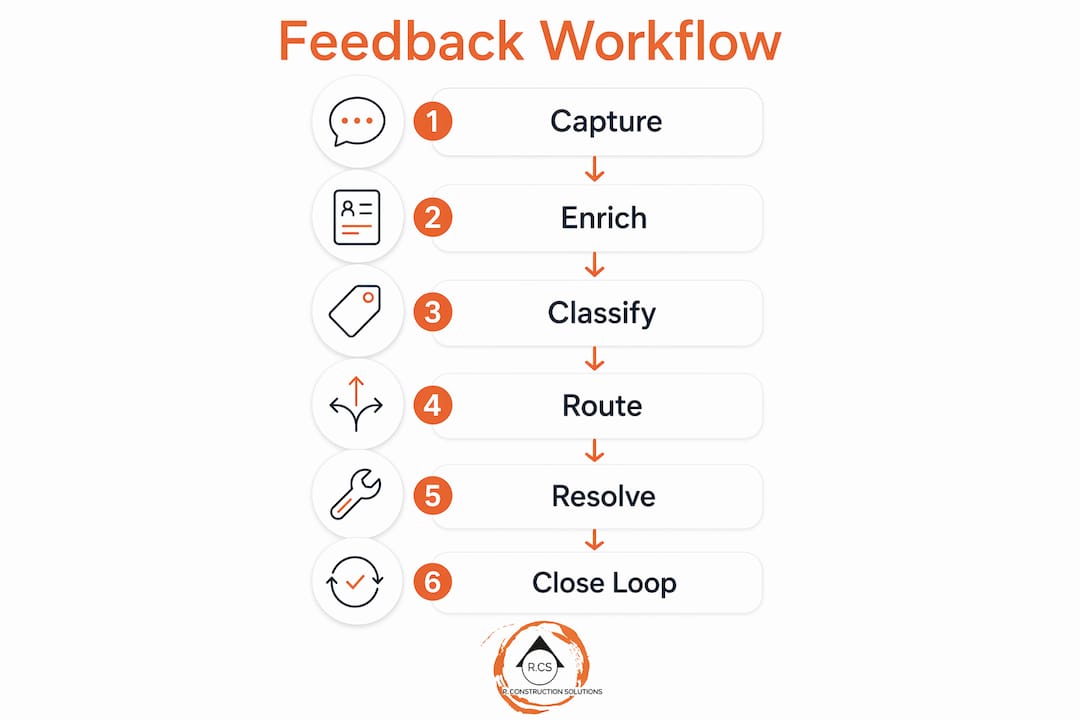
Close the loop means notifying the client that their feedback was heard and acted upon. This single step has a measurable impact on retention. Clients who receive a follow-up confirming resolution are significantly more likely to return and recommend the business to others.
How AI and automation tools improve feedback quality and timing
The practical power of automated feedback systems becomes clearest when you examine a real workflow. The n8n workflow for testimonial collection illustrates a two-phase approach: the outreach phase triggers immediately at project or session completion, while the AI processing phase activates only after a valid response is submitted. This separation reduces unnecessary notifications and keeps the workflow deterministic.
In the outreach phase, the system checks timing conditions, personalizes the message using client data from the CRM, and sends the request. If no response arrives within a defined window, an automated reminder goes out. The message references the specific service the client received, which increases open rates and response quality compared to generic survey blasts.
Once a response is submitted, the processing phase begins. AI tools like Claude analyze sentiment, assess response quality, and generate a polished testimonial draft if the feedback is positive. That draft can be routed for approval and published to Google, Yelp, or industry-specific review platforms automatically. The CRM record updates, and a thank-you message goes to the client. The entire sequence runs without manual intervention.
- Trigger outreach immediately after service completion with personalized messaging
- Apply smart timing checks to avoid sending requests during off-hours or too close to a prior message
- Run AI sentiment analysis on submission to classify tone and urgency
- Generate testimonial drafts from positive responses and route for approval
- Publish approved testimonials to review platforms and update the CRM record
- Send automated follow-ups to non-responders based on their position in the customer journey
Data-driven dashboards aggregate the results. Managers can see response rates by service type, average sentiment scores by staff member, and resolution times by category. This visibility turns feedback from a passive collection exercise into an active management tool.
Pro Tip: Separate your outreach trigger from your AI processing trigger. Fire the survey request the moment the session ends, but only run enrichment and classification after the client submits a response. This keeps your workflow clean and prevents unnecessary API calls.
What compliance and consent requirements apply to automated feedback collection
Compliance is not optional in automated feedback collection, and treating it as an afterthought creates legal exposure. GDPR consent requirements specify that consent must be freely given, specific, informed, unambiguous, and withdrawable at any time. Pre-ticked boxes and bundled consent clauses do not meet this standard.
Beyond consent, businesses operating across jurisdictions face different rules for tracking and cookies. GDPR requires opt-in consent before loading non-essential cookies, while CCPA operates on an opt-out model with mandatory notice and record-keeping. Both frameworks prohibit dark patterns in consent interfaces, a requirement that was reinforced in 2026 updates to both regulations.
Practical compliance within a feedback automation workflow requires several mechanisms:
- Include a clear privacy notice in every feedback request explaining what data is collected and how it is used
- Provide a one-click opt-out link in every automated message
- Maintain an audit trail of when consent was given, what the client agreed to, and any withdrawal requests
- Design your data model so that individual responses can be deleted without corrupting aggregate analytics if a client withdraws consent
- Use truly anonymous surveys when possible to remove consent complexity entirely
Consent withdrawal is where many businesses fail. Documenting the initial consent is common practice. Documenting the withdrawal and confirming deletion of the associated data is not. Automation workflows built with compliance in mind handle both automatically, logging every consent event and triggering deletion sequences when a withdrawal request arrives.
For businesses using messaging channels like WhatsApp for feedback collection, WhatsApp automation compliance adds another layer of requirements around opt-in messaging and template approval that must be integrated into the workflow design from the start.
Pro Tip: Plan your feedback data model before you build the workflow. If you cannot delete a single client's responses without breaking your analytics, your architecture is not compliant. Anonymous surveys are the simplest path to avoiding this problem entirely.
How milestone triggers and detractor recovery improve feedback effectiveness
Static survey schedules produce static results. Milestone-triggered surveys sent immediately after a meaningful client event achieve 25 to 45% engagement rates, compared to the low single digits typical of weekly or monthly batch sends. The trigger is the key. A survey sent 10 minutes after a yoga class ends, a haircut is completed, or a car service is finished reaches the client at peak emotional relevance.
Dynamic question logic takes this further. Detractors, passives, and promoters receive different follow-up questions based on their initial score. A client who rates the experience a 9 or 10 gets a request to share a testimonial. A client who rates it a 4 or 5 gets an open-ended question about what could have been better. A client who rates it a 1 or 2 triggers an immediate recovery sequence.
The speed of that recovery sequence is the most important variable in retention. Detractor acknowledgment emails sent within 30 minutes increase recovery chances threefold compared to responses sent after 48 hours. One documented case showed that 30% of detractors recovered to passive or promoter status within 60 days when acknowledgment arrived within hours. Speed of response matters more than the quality of the message.
| Trigger type | Engagement rate | Recovery impact |
|---|---|---|
| Milestone-triggered survey | 25 to 45% | High relevance, higher response quality |
| Detractor acknowledgment under 30 min | 3x recovery rate | Prevents churn before it solidifies |
| Detractor recovery within 60 days | 30% status improvement | Measurable retention gain |
| Static weekly survey | Low single digits | Minimal engagement, low actionability |
Platforms like Encharge and Customer.io support these behavioral trigger sequences natively, allowing service businesses to build detractor recovery flows without custom development. The advanced trigger sequences that power these flows can be layered with CRM data to personalize every message in the recovery sequence.
Best practices for implementing and scaling feedback automation in service businesses
Starting with one well-defined touchpoint is more effective than attempting to automate every feedback moment at once. A post-support CSAT survey with automated detractor routing is the highest-value starting point for most service businesses. It is simple to build, easy to measure, and produces immediate retention impact.
- Define one key touchpoint and build the full six-step workflow for it before adding others
- Set explicit SLAs for each feedback category, assign named owners, and configure real-time alerts via Slack or email when SLAs are breached
- Integrate the workflow with your CRM and ticketing system so that resolutions are recorded as outcomes, not just replies
- Build a library of closed-loop message templates for the most common feedback scenarios, such as scheduling complaints, quality concerns, and billing issues
- Add a second touchpoint only after the first workflow is producing consistent, measurable results
- Review classification accuracy monthly and update your taxonomy to reflect new patterns in client language
Operational feedback loops require a system of record for resolutions. Recording that a reply was sent is not the same as recording that the issue was resolved. Your CRM entry should include the action taken, the staff member responsible, and the client's response to the resolution. This data supports both compliance auditing and continuous service improvement.
Scaling the system means adding touchpoints gradually: onboarding surveys, renewal check-ins, and in-app feedback prompts each add signal without overwhelming your team. The customer retention automation strategies that produce the best long-term results are built on this kind of layered, incremental approach rather than a single large deployment.
Key takeaways
Automated post-service feedback management works because it replaces passive survey collection with an active, end-to-end operational workflow that routes, resolves, and closes every feedback loop with measurable outcomes.
| Point | Details |
|---|---|
| Six-step workflow is the foundation | Every effective system covers capture, enrich, classify, route, resolve, and close the loop. |
| Milestone triggers outperform static schedules | Surveys sent immediately post-service achieve 25 to 45% engagement versus low single digits. |
| Speed of detractor response determines recovery | Acknowledgment within 30 minutes increases recovery chances threefold over 48-hour delays. |
| Compliance must be built in, not added later | GDPR and CCPA require documented consent, opt-out mechanisms, and data deletion capability. |
| Resolution recording is not optional | CRM and ticketing integration must capture outcomes, not just replies, to prove operational impact. |
Why operationalizing feedback changed how I think about client retention
I used to believe that the volume of feedback collected was the primary indicator of a healthy feedback program. More surveys sent, more responses received, more data to analyze. That belief is wrong, and I learned it the hard way watching businesses sit on thousands of unread survey responses while their churn rate climbed.
The shift that actually moves the needle is treating feedback as an operational input, not a reporting metric. The moment you attach an owner, an SLA, and a resolution requirement to every negative response, the entire system changes character. Staff take it seriously because there is accountability. Clients feel it because they receive a follow-up that references their specific concern.
The most common gap I see in service businesses is inconsistent tagging. Teams build a classification system, use it well for the first month, and then let it drift as new staff join and edge cases accumulate. Version-controlled labels, as described in the GitHub-based Customer Pulse pipeline, solve this problem by treating the taxonomy as a managed asset rather than an informal convention.
The second gap is unresolved feedback sitting in a queue with no escalation. Real-time routing with Slack or Teams alerts changes this. When a manager receives a notification within minutes of a detractor response, the recovery window is still open. Waiting until the weekly review meeting means the client has already decided to leave.
The businesses I have seen get the most from feedback automation are not the ones with the most sophisticated AI. They are the ones with the clearest ownership, the tightest SLAs, and the discipline to close every loop before moving on to the next survey cycle.
— Rowena
How Byrcs helps service businesses automate client feedback end to end
Byrcs builds feedback automation workflows specifically for service businesses, including medical clinics, hair salons, and auto shops, where the post-service moment is the highest-value feedback window. Every implementation combines CRM integration, real-time alert routing, and personalized messaging to cover the full six-step workflow without requiring a dedicated technical team.
The Byrcs approach starts with a single high-impact touchpoint, measures the retention and resolution outcomes, and scales from there. If you are ready to move beyond collecting surveys and start closing feedback loops that protect revenue, explore the BizOps automation platform to see how the workflow applies to your specific service category. Pilot implementations typically show measurable impact within the first 30 days.
FAQ
What is post-class feedback automation?
Post-class feedback automation is a closed-loop feedback management system that automatically collects client responses after a service session, classifies them using AI, routes them to the right owner, and records resolution outcomes. It covers the full workflow from capture to close, not just survey delivery.
How do automated feedback systems handle negative responses?
Automated systems detect negative sentiment during the classification phase and trigger a detractor recovery sequence immediately. Acknowledgment emails sent within 30 minutes increase recovery chances threefold, and documented case studies show 30% of detractors recover to neutral or positive status within 60 days.
What compliance rules apply to automated feedback collection?
GDPR requires freely given, specific, informed, and withdrawable consent for feedback surveys, while CCPA uses an opt-out model with mandatory notice. Both frameworks require audit trails, opt-out mechanisms in every message, and the ability to delete individual client data without corrupting aggregate analytics.
Which tools support post-class feedback automation for service businesses?
Platforms like Surveybox handle the full operational workflow, while n8n supports custom event-driven automation with AI processing via tools like Claude. Encharge and Customer.io manage behavioral trigger sequences for milestone surveys and detractor recovery flows.
How long does it take to see results from feedback automation?
Most service businesses see measurable changes in response rates and detractor recovery within the first 30 days of a single-touchpoint pilot. Full retention impact, measured by churn reduction and promoter growth, typically becomes visible within 60 to 90 days of consistent operation.
Recommended
Want this set up for your business?
Book a free 30-minute strategy call and we'll map out your automations together.
Book a Free Call