How Auto Shop Workflow Automation Works for Managers
By Rowena Tulacz · · 10 min read
How Auto Shop Workflow Automation Works for Managers
TL;DR:
- Most auto shop managers experience automation failures not because of poor technology, but due to systems that generate more work instead of less. Effective automation relies on seamless integration with existing software, clear workflow mapping, and simple triggers that operate silently in the background. Implementing and optimizing these systems can significantly enhance efficiency, communication, and customer satisfaction while reducing manual tasks.
Most auto shop managers who feel burned by automation tools didn't get bad technology. They got tools that created more work instead of less. Understanding how auto shop workflow automation works means looking past the marketing promises and getting specific about what these systems actually do, how they connect to your existing software, and where they genuinely save time. This article breaks down the core mechanics, the right technology stack, and the step-by-step process for putting it all together without disrupting your team.
Table of Contents
- Key takeaways
- How auto shop workflow automation works at its core
- Why integration makes or breaks your automation
- The technology stack that powers shop automation
- How to implement workflow automation step by step
- My take on what actually works in practice
- How Byrcs can get your shop running on autopilot
- FAQ
Key takeaways
| Point | Details |
|---|---|
| Integration is everything | Automation that doesn't pull from your existing shop software will create extra steps, not eliminate them. |
| Triggers drive the workflow | Every automated action starts with a trigger tied to a specific job stage, appointment, or customer event. |
| Communication runs on autopilot | Appointment confirmations, status updates, and review requests all send automatically without advisor intervention. |
| Tools need to work together | CRM, scheduling, and messaging must connect in one platform to avoid information islands across your shop. |
| Adoption depends on simplicity | Staff will use automation that feels invisible and skip anything that adds friction to their current process. |
How auto shop workflow automation works at its core
Workflow automation in auto repair, more formally called business process automation in operational management contexts, is the practice of using software to trigger predefined actions based on specific events in your shop's workflow. The system watches for a condition, such as a new work order opening, a job status changing, or a repair reaching a certain stage, and then executes a task automatically.
Think about what happens manually today when a customer drops off a vehicle. A service advisor writes up the work order, someone calls or texts the customer with an estimate, the tech flags the car as ready, and another person sends a follow-up asking for a review. Each of those steps can be automated.
Here's what a functioning system handles without human input:
- Work order creation and assignment: When a job is booked, the system generates a work order and routes it to the right technician based on skill set and availability.
- Appointment confirmation messages: The moment a booking is confirmed, an SMS or email goes out automatically as part of an auto shop appointment confirmation workflow.
- Status updates to customers: When a vehicle moves from "in progress" to "awaiting parts" or "ready for pickup," the customer gets a message instantly.
- Parts approval requests: If a tech identifies additional repairs, the system triggers an approval message to the customer, logs the response, and updates the work order.
- Review request automation: After job completion and payment, the system sends a review request as part of a pre-built auto shop review request automation sequence, timed to maximize response rates.
- Follow-up messages: A structured auto shop follow-up workflow setup can send a satisfaction check, a service reminder, or a seasonal promotion weeks after the visit.
Automation workflows trigger messages and move jobs forward at specific stages without any manual intervention. That's the mechanical foundation.
Pro Tip: Map your current workflow on paper before buying any software. Automation can only speed up a process you've already defined. If your steps are unclear to you, they'll be unclear to the system.
Why integration makes or breaks your automation
The biggest reason automation fails in auto shops is not poor configuration. It's the wrong architecture. Tools not pulling data from current systems see low adoption because they force employees to enter the same information twice. That's the opposite of efficiency.
Imagine your shop management software (SMS) already holds every customer record, vehicle history, and work order. If your automation platform doesn't connect directly to that system, your service advisor has to copy data from one place to another. Within a week, they stop using the new tool. You've spent money to add a problem.
"Automation that feels like an extra step is destined to fail; integration and alignment with existing shop workflows are key to success." — Industry insight from autoTEXT
The right approach follows a clear sequence:
- Audit your existing software stack. List every tool your shop uses: management system, parts ordering, scheduling, customer communication. Know what data lives where.
- Identify the connection points. Ask vendors specifically which shop management platforms their tool integrates with natively. "Integration" claimed in marketing can mean anything from a full two-way data sync to a basic CSV export. Demand specifics.
- Prioritize native integrations over Zapier workarounds. Third-party connection bridges add fragility and often break during software updates. Native integrations are built and maintained by the vendor.
- Test with real data before committing. Run a pilot using actual customer records and job types. If your staff has to touch something twice during testing, they'll avoid it in production.
Poorly integrated tools cause data duplication, manual re-entry, and genuine frustration across your team. Good integration, by contrast, means your automation runs in the background while your advisors focus on customers standing at the counter.
The technology stack that powers shop automation
Understanding the tool categories helps you evaluate what you actually need versus what vendors want to sell you.
| Tool Category | Primary Function | Auto Shop Application |
|---|---|---|
| CRM platform | Customer data, history, messaging | Tracks vehicles, contacts, job history in one place |
| Scheduling software | Appointment booking and dispatch | Automates calendar management and technician assignment |
| Kanban board tool | Visual workflow management | Shows every vehicle's current stage in real time |
| SMS/email platform | Outbound automated messaging | Sends confirmations, updates, and review requests |
| AI-assisted review tools | Automates review requests and responses | Generates draft replies and times outbound requests |
Kanban boards visualize the vehicle service journey, improving repair speed and reducing internal miscommunication between the workshop, warehouse, and front desk. When a card moves on the board, automations fire behind it.

On the communication side, automated messaging covers appointment confirmations, service updates, and review requests without requiring an advisor to write a single message. For shops handling 50 or more repair orders per week, this alone recovers several hours per day.
For shops serious about reviews, AI-powered tools automate review requests, generate draft responses, and optimize the timing of outbound messages. The better platforms include a human-in-the-loop approval mode, so your team can review AI-drafted replies before they go out. That keeps your brand voice intact without making the process manual again.
The highest-performing setups don't use five separate tools. Centralized systems reduce information islands, provide real-time visibility across the shop, and support smarter decisions. When your CRM, communication platform, and task management live in one environment, the automation learns from a single source of truth.
If you want to understand how these platforms connect in practice, the Go High Level automation guide from Byrcs covers the architecture in detail for B2C service businesses.
How to implement workflow automation step by step
Knowing how auto shop workflow automation works is different from actually deploying it without creating chaos. Here's a practical sequence that works for shops of any size.
Step 1: Map your bottlenecks before selecting tools. Interview your service advisors and techs about where jobs slow down. Common answers include waiting for customer approvals, manual status calls, and forgotten follow-up messages. These are your automation targets.
Step 2: Choose software that fits your existing stack. Improving auto shop efficiency through automation starts with compatible tools. A platform that combines CRM, communication, and task management in one system cuts setup time and reduces failure points.
Step 3: Build your trigger-action maps. For each workflow, write down the trigger (job reaches "diagnostic complete"), the condition ("customer has a mobile number on file"), and the action ("send approval request via SMS"). Start simple. One trigger, one action. You can layer complexity later.
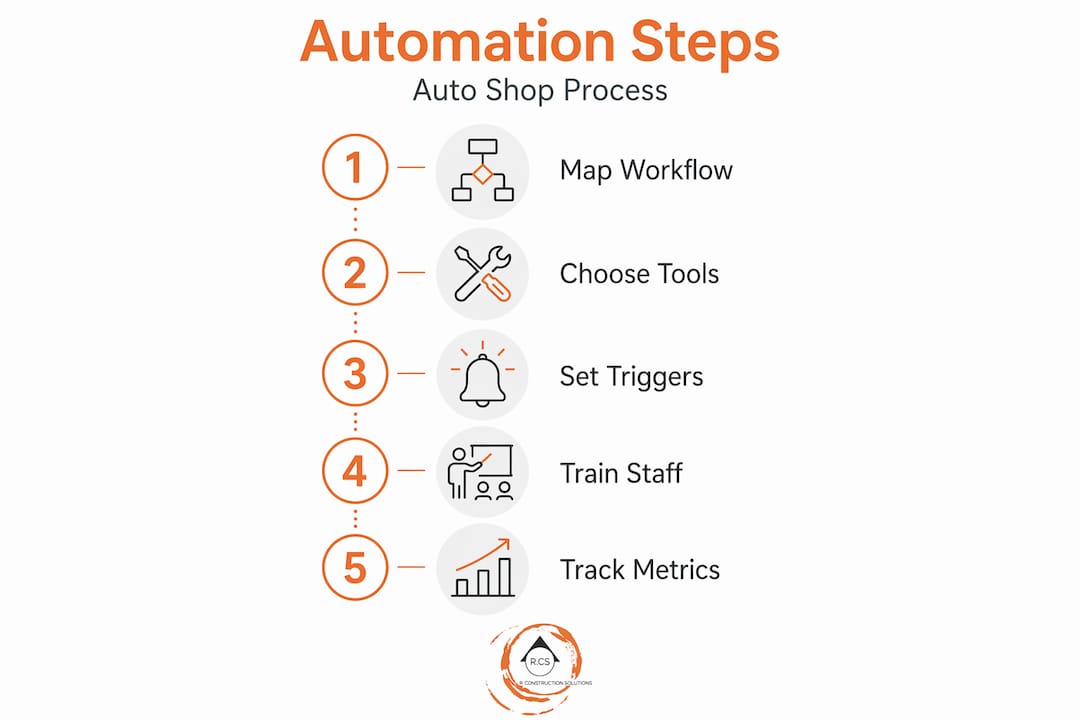
Step 4: Train staff on what the system does, not just how to use it. Your advisors need to understand that when they update a job status, a message fires automatically. Automation scales workflows and frees teams to focus on high-value tasks, but only if the team understands what the system is handling on their behalf. Confusion leads to duplicate manual messages going out alongside automated ones.
Step 5: Set up your review and follow-up sequences. The auto shop follow-up workflow setup should include at minimum a post-service satisfaction message, a review request 24 to 48 hours after vehicle pickup, and a service reminder at the appropriate mileage or time interval. How auto shop review automation works in practice is simple: the system detects job closure, waits the defined delay, and sends the request to the right channel based on customer preference.
Step 6: Monitor metrics weekly for the first 90 days. Track open rates on automated messages, review acquisition rates, appointment no-show percentages, and average response time on approval requests. Adjust message timing and content based on real data, not assumptions. Check out the workflow optimization strategies from Byrcs if you need a framework for measuring and adjusting after launch.
Pro Tip: Build your review request automation before your follow-up sequences. Review velocity is the fastest-return automation for most shops, and the setup is simple. Get that win first, then expand.
Common pitfalls to avoid include automating too many touchpoints at once (customers notice when every interaction feels scripted), skipping staff training on what the system handles, and choosing platforms based on price without confirming integration depth with your specific shop management software.
My take on what actually works in practice
I've worked alongside enough service business operators to know that the automation conversation almost always starts in the wrong place. Managers ask "what tool should I use?" when the real question is "what am I trying to stop doing manually?"
In my experience, the shops that get the most from automation are not the ones with the most sophisticated setups. They're the ones who identified three specific pain points, automated those three things well, and didn't try to automate everything at once. I've seen a busy shop cut advisor phone time by half just by running proper appointment confirmations and status updates automatically. No AI, no complex CRM. Just consistent triggers on existing job stages.
What I've learned about staff adoption is blunt: if an advisor has to learn a new login, you've already lost them. The tools that stick are the ones that fire silently in the background while the team works in the system they already know. That's not a product feature. That's an architecture decision you make before you buy anything.
The review automation piece is where I see the clearest wins with the least resistance. How auto shop review automation works in a well-integrated setup is almost invisible to the staff. Job closes, payment processes, review request goes out. Nobody had to remember anything. For shops competing on local search visibility, this is where the return is most measurable and most direct.
My strongest advice: don't let a vendor convince you that complexity equals capability. The best automation for an auto shop is the kind nobody notices is running. When your team isn't thinking about it and your customers are getting timely, relevant messages, the system is doing its job.
— Rowena
How Byrcs can get your shop running on autopilot
If you've mapped your bottlenecks and you're ready to connect the right tools, Byrcs builds automation systems specifically for service businesses like yours. The BizOps automation platform combines CRM, SMS and email messaging, appointment workflows, and review request automation in one environment that integrates with your existing shop software. You're not piecing together five different subscriptions and hoping they talk to each other.
Byrcs clients in the service sector have seen a 30% revenue increase and a 95% client satisfaction rate after implementing automated workflows. The team also cuts manual task load by an average of 50%, which means your advisors spend time with customers, not keyboards. Explore the full range of automation services for shops and see which workflows fit your operation.
FAQ
What is workflow automation in an auto shop?
Workflow automation in an auto shop uses software to trigger actions automatically at specific job stages, such as sending appointment confirmations, status updates, or review requests, without requiring manual input from staff.
How does auto shop appointment confirmation automation work?
When a customer books a service, the system detects the new appointment record and sends a confirmation message via SMS or email automatically, based on pre-set rules tied to the booking trigger.
Why do some auto shop automation tools create more work?
Tools that don't integrate with your existing shop management software force employees to enter data in multiple places. Automation not pulling from current systems adds workload and sees low adoption as a result.
How does auto shop review request automation work?
After a job is closed and payment is processed, the system waits a defined period (typically 24 to 48 hours) and then sends a review request to the customer's preferred channel. No advisor action is needed.
What metrics should I track after setting up shop workflow automation?
Track message open rates, review acquisition rates, appointment no-show rates, and customer approval response times. Review these weekly for the first 90 days and adjust triggers and timing based on actual performance data.
Recommended
- Appointment Setting Automation: Never Miss a Lead Again | BizOps - B2C Automation Experts
- CRM Automation Strategies That Increased Our Client's Revenue by 300% | BizOps - B2C Automation Experts
- The Ultimate Guide to Go High Level Automation for B2C Businesses | BizOps - B2C Automation Experts
- E-commerce Automation: From Cart Abandonment to Upsells That Convert | BizOps - B2C Automation Experts
Want this set up for your business?
Book a free 30-minute strategy call and we'll map out your automations together.
Book a Free Call